There's a really nice UI for making basic interactive web applications using the Arduino IDE on ESP microcontrollers, ESPUI. This is a real shortcut to usability for very basic "push a button a on web page and something happens" projects as it works asynchronously and does all the behind the scenes dirty work for you.
It does have one dull limitation though, it doesn't by default work as a captive portal. You can bodge a fix to this with the following steps.
This means any time a request for an unexpected URL hits the Web Server on the ESP it will redirect to the root of the server. You can change this to some other URL by changing the "/".
Now this still won't get all requests to hit the ESP, you need to add the following bits into the rest of the sketch. This assumes your ESP is acting as an AP on the usual IP address 192.168.4.1, but you can see how it's easily changed.
<near the top of the sketch> #include <DNSServer.h> IPAddress apIP(192, 168, 4, 1); DNSServer dnsServer;
void setup() { <rest of your setup stuff> dnsServer.start(53, "*", apIP); dnsServer.setErrorReplyCode(DNSReplyCode::NoError); }
void loop() {
<rest of your loop stuff>
dnsServer.processNextRequest(); }
I really should submit a more complete solution as a pull request and new example to the library.
Now when most devices hit the ESP they will take you straight to the page asking you to "sign in" etc. and it doesn't stop you manually going to the page.
For absolutely ages I've fancied building a remote controlled rover that's got some physical heft and can handle rough ground. I've never really been into RC cars but a 'robot' is different.
This urge goes all the way back to the 90s when I was a fan of the TV show Robot Wars and at one point I got as far buying some big AGM batteries and wheelchair motors but like with a lot of projects my enthusiasm fizzled out. Part of this was because back when I was first looking at it this was an expensive hobby. Good quality speed controllers, good RC gear and access to the materials and machine tools needed to build something (unless you worked for an engineering company or University Engineering dept.) implied a level of investment in time and money I couldn't really do. I eventually became friends with some people who had competed in Robot Wars but I never built a 'robot' myself.
Now we live in quite a different world.
Electric vehicles of all sizes are now commonplace; from RC quadcopters to commuter scooters, electrically assisted bicycles, motorcycles and cars. Developments in battery technology, brushless motors and semiconductors haven't only been technical improvements but also the cost/performance improvements that come from massive scale manufacturing.
Also, all manner of hobby electronics and computing has become hugely more affordable and accessible. I'm an active member of a Hackspace with access to all the tools I could reasonably need to make something viable and I've a bunch more free time than I used to have, at least for now.
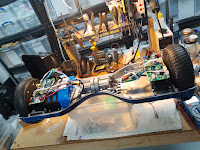
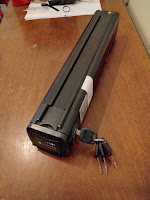
My recent trip to EMFCamp 2022 got me enthused again and while there I bought a 36v eBike 'Silvertail' battery pack as it's a well packaged large chunk of power with a built in battery management system. I've also dived in and bought some broken 'hoverboards' to play with.
The craze for hoverboards a few years back created a glut of cheap second hand ones, often 'dead' due to poor battery management making them refuse to charge. The same poor battery management also lead to a number of dangerous house fires, a reputation that still persists despite battery safety getting better.
Naturally, Hackspace people got hold of these and tried to do things with them.
The motors are very high performance for the bargain bucket second hand price and come with everything you need to drive them, maybe even battery packs if you can replace any dead cells without setting fire to anything. Good speed controllers are still expensive but the ones in hoverboards are kind of adequate.
Lucy Rausch worked out how to replace the original firmware for the ubiquitous controllers in early hoverboards and a whole load of people built comedy vehicles with them. A bunch of Germans are very into converting the popular children's ride-on "Bobby Car" toys into absurdly nippy little vehicles.
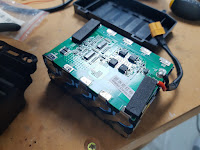
I've bought two of these 'dead' hoverbaords and even had a go at reviving the battery packs.
What could possibly go wrong?
There isn't a huge plan here. I just want to enjoy exploring how this works and as I'm coming at it after everybody else has already had a go there's plenty of information out there.
My minimum viable rover is just four hoverboard wheels, controllers and recovered battery pack screwed to a piece of plywood. This is not its final form, which may be six wheeled with rocker/bogie suspension in a vague Mars Rover homage.
The whole project has a bit of a 'what people were playing with 5-10 years ago' thing going on. It's not unexpected as where possible I'm using stuff I already have kicking around in the cellar.
Lacking any RC gear I made my own 2.4Ghz remote using a Wii Nunchuck controller which were ubiquitous in Arduino projects a while back and a couple of ESP8266 microcontrollers sending ESP-Now packets.
I ended up reasonably happy with the resulting code and might publish it even though it overlaps a bit with other published projects.
I'm also minded to play with a bit of collision avoidance and/or location mapping. Not to make the rover autonomous but to make it 'hard to crash into stuff'. This can advance separately from the chassis and basic remote control use. What was everybody enthusing about ten years ago that I had in a crate of junk?
The Microsoft Xbox 360 Kinect.
It's old hat, doesn't work outdoors in direct sunlight and getting old enough that support in modern versions of Robot OS might have disappeared enough that I give up on the idea, but I do have one and it does work as I've tested it with a fresh compile of the open source libraries.
I know in my heart I'll have to buy a proper LIDAR sensor (which like almost everything else have become massively more affordable) but in the meantime I can tinker with this.
So how far have I got?
Not massively far but I do at least have one pair of wheels moving.
Since the original explosion of hoverboard hacking the controller hardware has changed and you can't use Lucy's firmware, but various people have adapted it to the controllers they've found in their hoverboards or even started again from scratch.
One of my scrap hoverboards had controllers supported by one of these firmware variants, the other didn't.
A bit of peering at markings on the microcontroller suggests I could probably reverse engineer the board rework the pinouts and make my own firmware variant but that's going to be time consuming. So I've ordered another pair of identical boards to the supported ones. This was about the same price as another dead hoverboard but you won't know which controllers are inside until you open them.
As I've mentioned before, all the stuff I work on tends to be to make props for Live Action Role Playing (LARP) events. LARP comes in many flavours but the variant I'm involved in has people solving problems and fighting skirmishes with Lasertag weapons as part of a collaborative story, usually with a science fiction element.
With the arrival of the pandemic, almost all LARP except that which was conducted via video chat went on hiatus, including a game we'd been planning for a couple of years.
However things kicked off again for us on the weekend of 3-5 September 2021 with an 'anthology event' that consisted of several short games. After a chat with one of the game organisers I agreed to set up some stuff to round their Cyberpunk themed game out.
We play on exclusively outdoor sites, almost always with no access to mains power or permanent Internet service so everything needs to be self-sufficient for the duration of the game. Also with only a couple of hours of setup time available it needed to go out quick and dirty right beforehand.
I put together several elements that got included in the game, spread across three different locations on the site.
Long time no post, I've been kind of away from microcontroller project work recently. Having picked up coding again I've come across an interesting issue with ESP-Now on ESP8266.
It's not really an issue as such, but might catch you out.
Most of the time, when you send ESP-Now packets with...
esp_now_send(uint8 *da, uint8 *data, uint8 len);
...there's a temptation to assume they will always be sent.
However packets are not sent until the core gets around to it.
If your code does some slow blocking work after asking for the packet to be sent, the core will abandon sending the packet silently. You should instead register a callback function with...
esp_now_register_send_cb(esp_now_send_cb_t cb);
...and only continue with other activity, especially slow blocking activity, once that occurs.
My code was registering callbacks but as all it seemed they did was confirm a send I didn't really need confirming, the functions were stub ones where I'd commented out everything of note.
Most of the time this won't catch you out, but the timeout before the core abandons sending is rather short. A very dirty workaround might be to delay/yield for a short while after sending, but flagging the send as successful or not in the callback is the better option.
I had been struggling with unexplained packet drops in certain parts of my big ESP application and waiting for the send callbacks has eliminated these. A less I/O heavy application would probably never experience them.
I've been doing lots of work on the flow of things in the user interface in the terminal application so it works better. The deeper in I get the more boilerplate I'm writing to make buttons appear and disappear without leaving stuff floating around, so it's quite slow progress.
On the plus side, the syncing of user accounts and so on is working nicely and I've now made it so that it live updates. Make a change to a user and it appears near-instantly on the other terminals. Previously it synced the files on the SD card but they didn't show until a reboot.
Actually coding that to happen took another swathe of boilerplate but each time I do a thing like this I'm edging closer to a believable looking application. Also a bit of bugfixing which might have finally nailed the occasional exceptions when using a mouse.
As it's getting closer to something I can demonstrate I did a quick show and tell on Brian Lough's 'Project Doc' stream this evening. Which I believe is recorded for posterity.
I've done a little more work on my retro 'computer terminal' application. When it started out, the key feature was messaging over the mesh network library I've also been working on.
All the code was there but just commented out while I got the user interface library knocked into shape. So I uncommented it and spent some time making some improvements. Again it also showed up some limitations in the UI library. Most of these were around showing/hiding the cursor and moving it back to the line where you're typing reliably.
With these ironed out, the basic chat functionality pretty much just worked despite being written a year ago and not touched since.
I've done a little video of two terminals sending chat messages. At one point I had a 'bot' that produced Lorem Ipsum any time there was activity in a chat. I must dust that off.
I finally got this library knocked into shape enough that I could start porting my application to it. Doing so showed up even more shortcomings but I've now fixed this and we're back into feature creep.
The application pretends to be a 'computer terminal' and needs to deliver movie style retro computer interactions. Once of these is looking at files stored on the SD card attached to the microcontroller. Which will sync across multiple 'nodes' running the same code.
I've spent a chunk of time this week improving how large chunks of text (or small files) display and have added support for basic Markdown formatting. You've limited capabilities in a dumb terminal but I think it does well enough at stopping it being a wall of uniform text.
Here's a quick video demo of the user interface in action. It can be driven entirely with keyboard but also the mouse works and you can click the buttons, scrollbar on the text window and so on.
This week I'm back working on my 'rod for my own back' project, ie. making a library to display a useful user interface over the UART of a generic microcontroller.
This week I've started on actually using it for its intended purpose, faking up a retro mainframe computer on ESP8266/ESP32. Trying to refactor my original code for this application to use the library has shown up a few of things.
First I was definitely right to pull out all the code and turn it into a generic library. Secondly it was missing a few features I need but thirdly and most annoyingly it still has lots of bugs.
In particular I had created lots of bugs with redrawing changing items or things that appear, disappear or change frequently. The main application is too complicated to troubleshoot with so I wrote this trivial alarm clock. You set the time and alarm with the +/- under each digit and when they match it turns red, rings the bell and a cancel button appears.
Trivial as this application is, it's really helped with the troubleshooting and I've added a load more functions, one of which changes the title bar of the terminal emulator, if allowed. It's all boilerplate, not fancy algorithms, but I still get a real sense of satisfaction in controlling an AVR Arduino with the mouse and keyboard on the computer it's plugged in to.
It's been a while since my last update on this library, but I have been working on things slowly. I got buried deep in the hole of optimising memory until you could again use my library on an AVR Arduino board, but perhaps more importantly it massively reduces the memory footprint on other things.
I got bogged down in the messy detail of handling the AVR program space functions, especially when trying to make it also compile and run for ESP8266. The Arduino core for ESP8266 provides similar looking functions but they don't behave exactly the same. Also I encountered some messiness when trying to use them inside a C++ class, in ways I should have realised was verboten.
Regardless, now if you pass the library a string type argument stored in program space it marks it as such and accesses it differently, depending on the processor. This includes using different methods to find the length of strings for centring and so on.
Time consuming fiddly stuff but it had to be done and finally you can run the example code on an Arduino Nano again, only consuming 1124 of 2048 bytes dynamic memory. The sketch does use most of the program storage, which is down to the large amount of text stored there. It runs stably, something you can easily compromise when throwing lots of string data around with a small margins on the stack.
I've enjoyed this learning exercise, but I now need to test my library with other architectures supported by the Arduino IDE, such as a Teensy with an ARM Cortex-M4. In these cases it shouldn't be so necessary to store small chunks of text in program storage but it is something I would like to be sure of working. I believe I have a Teensy 3.2 somewhere.
In this update I show the work I've done on styling widgets with colours, different box drawing characters and different positions for labels/shortcuts.
Another update on my terminal interface UI library and after lots of code cleanup it now handles multiple editable text input fields. I started using OBS to capture the output with so this video is cleaner than the first ones.
To recap I've now got the following working as simple to create 'widgets', any of which you can have multiples of on the screen at the same time and swap between them with keyboard shortcuts or the mouse.
Buttons
Checkboxes
Radio buttons
Text boxes with scrollable content
Single line text input fields
At this point it's using more memory than is practical on classic AVR Arduino boards but I know I'll be able to reduce the footprint a lot later.
More work on the terminal UI library, but I've now added radio buttons and a scrolling text window, useful for showing a larger block especially from an SD card or stored in program flash memory.
If loading from an SD card it would need to be loaded into the memory of the microcontroller, I've not yet added support for very large blocks of text.
A chunk of my work has always been about building things with microcontroller boards (either classic Arduino AVR or ESP8266/ESP32) that you interact with directly.
For our (postponed) LARP event in March I had created a fake 'computer terminal' that you interacted with, where all the work is done on an ESP8266. RFID cards log a user on and there was a chat application, file viewing and so on, all using my ESP-Now mesh network to allow the individual terminals to send messages to each other.
In order to make this I used ANSI/VT100 escape sequences to create a very simple 'application' that you accessed using a terminal emulator, PuTTY, running on old laptops.
It's not wrong to argue this is the 'tail wagging the dog' when there's a much more powerful computer just running PuTTY but the guiding factor was the mesh networking, not the application itself. It also meant anything you could run PuTTY on could quickly and easily be pressed into service as a terminal and PuTTY is available for Windows and Linux. Likewise any other terminal emulator that supported a broad range of terminal capabilities could be used, but all my testing has been with PuTTY.
In the weeks before the event, I was in a 'crunch' working on various props and technology for the game 14+ hours a day until suddenly we postponed due to the pandemic.
As irritating as this was it's given me time to turn this work into a re-usable Arduino library. Such things already exist to place the cursor, change colours and so on but the one I've been working on has 'widgets' like mouse-clickable buttons and does the work of drawing/updating them for you.
The idea is if you have an Arduino project that needs a user interface, perhaps one that's infrequently used, you can build this with minimal pain. Then to access it you just connect a USB cable and there's a terminal UI available over the serial connection. Sadly it does not work in the Arduino console monitor as it's not a proper terminal application, but PuTTY isn't onerous to install.
I have an aspiration this would be usable over the network on microcontrollers with Wi-Fi such as the ESP8266 but it probably has more value on those without. If you've got Wi-Fi, basic web server front ends are going to be more flexible.
I've been doing a little home automation with Home Assistant recently and this involved putting temperature sensors in every room. I started out with some ugly stripboard SHT11 based things but they were unreliable and inaccurate.
During a Banggood sale I managed to pick up some Wemos 'shields' with an SHT30 temperature/humidity sensor so I converted all my sensors over to these. Tidier but still a bare circuit board with power LEDs lighting the room at night.
I fiddled around in OpenSCAD and came up with a fairly decent 3D printed enclosure and now have eight sensors dotted around my house, including the shed. This design leaves the SHT30 sticking out in free air with a 'baffle' to separate it from the rest of the device. Even so the temperature readings are massively effected by heat soak from the ESP8266 and quite inefficient LDO on the board. I've now put this on Thingiverse.
To fix the heat soak you need to connect D0 to RST on the D1 mini with a short piece of wire and enable deep sleep so they draw (and waste) much less power. In Tasmota this needs two console commands...
TelePeriod 10
DeepSleepTime 300
...the 'TelePeriod' means it sends data 10s after connecting to WiFi and 'DeepSleepTime' means it sleeps until the next five minute interval on the clock. If you're copying this example don't issue the commands until you're happy with the Tasmota configuration. The short wake time makes it a pain to issue changes later.
The library has an option to turn the RFID antenna on and off. Simply shutting it off and turning back on to check the card periodically seems a 100% stable solution.
Obviously you should also check the card hasn't been swapped by checking the ID hasn't changed but here is a a minimal sketch to do this. As checking for a card stops it appearing as new it's easy to get the logic messed up but this is a tested and working example.
Note to self: start putting stuff on GutHub.
#include <SPI.h>
#include <MFRC522.h>
const uint8_t SS_PIN = D8; //My example code is for a WeMos D1 mini, change these to match your setup
const uint8_t RST_PIN = D0; //My example code is for a WeMos D1 mini, change these to match your setup
MFRC522 rfid(SS_PIN, RST_PIN);
bool cardPresentWhenLastChecked = false;
bool antennaEnabled = true;
uint32_t cardCheckTimer = 0;
void setup()
{
Serial.begin(115200);
SPI.begin();
rfid.PCD_Init();
Serial.println(F("Checking for RFID card removal"));
}
void loop()
{
if(millis() > cardCheckTimer)
{
//Start a check of the card
if(antennaEnabled == false)
{
//Turn the antenna back on
rfid.PCD_AntennaOn();
antennaEnabled = true;
//It takes time to wake up the RFID card so the sketch needs to wait before checking for it
cardCheckTimer = millis() + 20ul;
}
else if(antennaEnabled == true)
{
if(millis() > cardCheckTimer)
{
//Check for a card after a delay for it to power up
After a chunk of work I've got file syncing working fully. The code does a simple manifest of everything on the SD card except for the irritating "System Volume Information" directory Windows puts on there if you view the card on a Windows system.
As my mesh network isn't designed to be high bandwidth and I'm not expecting the files on there to change often, this is a slow, lightweight process. After all it's only running on an ESP8266, don't expect BitTorrent.
The steps the mesh takes to sync are broadly...
Recursively iterate the whole file system on the SD card
Open each file and do a CRC16 of it
Store the full path and filename, size and CRC16 in a data structure
Write this to a simple flat file to save this across restarts. Each file is given a sequence number starting at one that increments with each change
Once all the files have been read, XOR all their CRC16s together and store it
The total number of files and this XOR of the CRC16s are advertised periodically by each node flooding the whole mesh
If a node receives a XOR that doesn't match its own it asks for the CRC16, size and sequence number of each file on the other node, one at a time
Some simple if/then/else logic decides if it needs the other node's version of the file
Files are transferred 64 bytes at a time in a TFTP-esque manner
Once the XOR and number of files match the two nodes are considered synced and stop
To detect change from an initially synced state, if a file is changed the new CRC16, size and sequence number are flooded to the whole mesh immediately
Notification of deleted files use a similar mechanism and stay in the data structure
There are timeouts and retries on the various steps in the process so it will fail fairly gracefully and restart
This is probably full of edge case horrors and has no way to handle file conflict resolution. I don't care, this is not an enterprise class distributed file system, it's a bunch of microcontrollers in a field that I need to have the same files on, mostly, and stay in sync, mostly.
This is another little update, I have basic file transfers working, woohoo!
There is no authentication but some basic sanity checking of the data, ie. is the packet from the station it expects, for a file it expects and the chunk it expects next. It's pretty much like TFTP but done over my proprietary mesh network stuff.
I'm currently only shipping 64 bytes at a time, inefficiently packed too, so it's going to suck for large files but the process works and will chunk through a queue of files happily grabbing them.
Now the code needs cleaning up and to allow for things like failed transfers.
I also need to go back to the file manifest handling as it handles change, but not initial seeding. However this is a really positive step forwards.
The last couple of days I've been messing around with code for building a 'manifest' of the file system on the SD card then notifying changes to other stations.
This has taken a lot of time as I had a few false starts in my reinvention of this particular wheel. I think I trashed my plan and started again at least three times and it's probably still a quite naive scheme. As things stand it's just notification of change, the other station knows if there's an updated file but there's no method to transfer the file as yet.
Oddly I don't think file transfer will be hard. The way I've put my mesh library together makes it quite easy to push arbitrary data around. It will just need to be chopped up into chunks and sent. Maybe also 'lock' the file to prevent local changes while any transfer occurs, just in case.
Progress on the messaging application is going OK.
I'm having a little aggro with RFID. It works, but not reliably so after 3-4 uses of the card it becomes unresponsive. This may be related to the code I've cribbed from an example to continuously poll the card and check if it's been removed. This might crash the reader but I'm not 100% sure. It's also quite possible I've messed up the state machine that handles the logon process in some way related to idle logoffs.
What is going quite nicely is building a file structure on the SD card with global, per-station and per-user configuration files. This is massively old-school way of doing things but is easily human-readable without writing an admin interface.
An easy example, above, is the 'message of the day' above where the cyan text is 'global' and the 'green' per-station.
I'm now working on an interface for users to display their stored files. Once this is done I would like to make it sync across the workstations with a TFTP-esque setup where the station with the highest sequence numbered file distributes it to the others. This needs to be in place for persistent messaging across different workstations, but will make the configuration more easily maintainable. It's probably going to need metadata stored in each directory, hidden from the user and I can see myself using JSON for that.



 I've been doing a little home automation with Home Assistant recently and this involved putting temperature sensors in every room. I started out with some ugly stripboard SHT11 based things but they were unreliable and inaccurate.


